

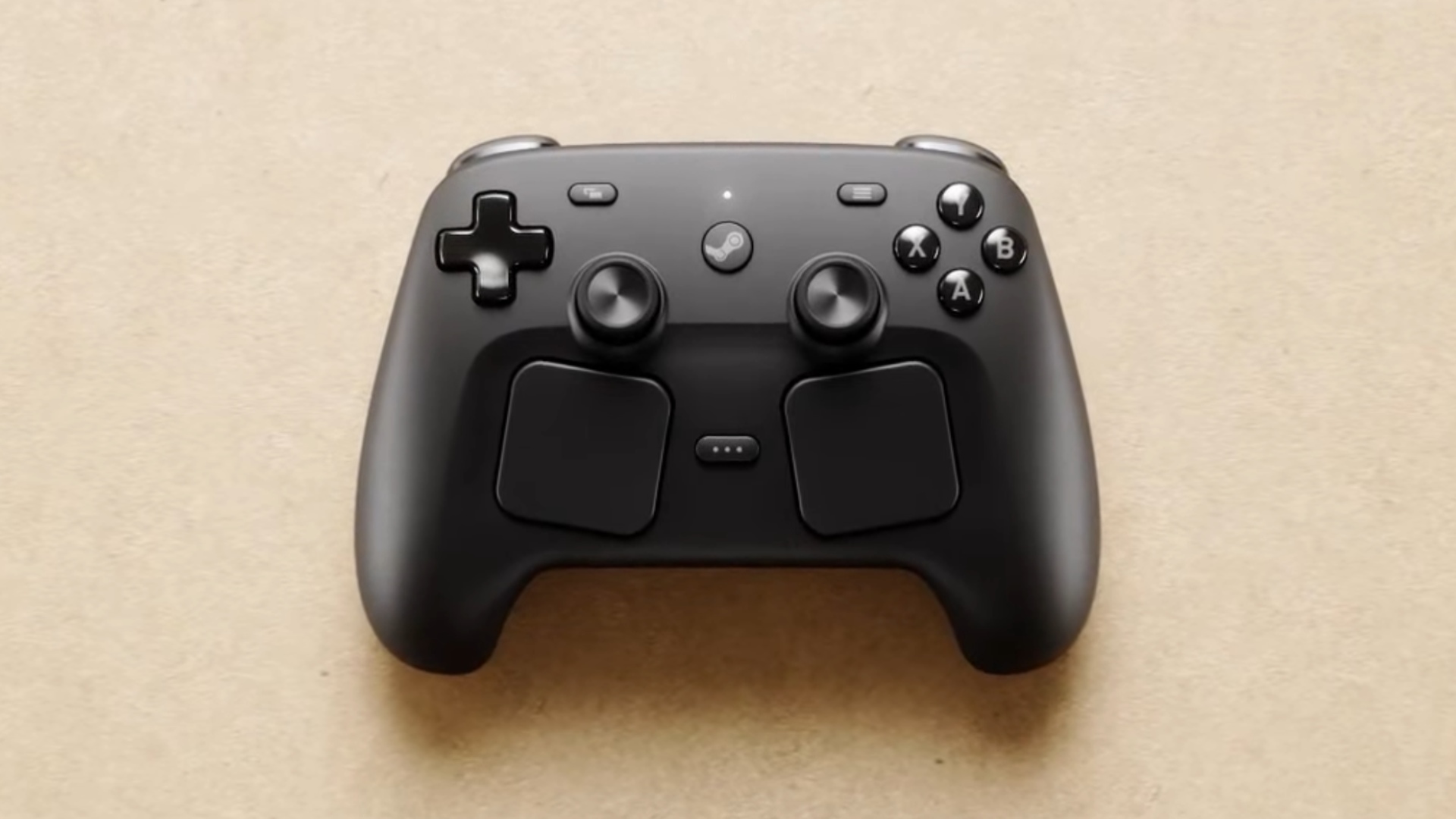
Leaker here is Brad Lynch, who generally seems reliable as a leaker for Valve software and products. He was also the source for the leaked renders of the steam controller.
That controller is the lynchpin for making a mini PC my future home theater center. I care for it more than the steam machine
I know you didn’t ask but i recommend looking into a rii mini keyboard with trackpad as well.
Same. Its a perfect device for running an HTPC / living room gaming device. Im planning navigate through streaming options, kodi, steam remote play, moonlight, and a bunch of emulators all with the same controller.
Same. I desperately hope they release a version with the regular thumbstick layout instead of the PlayStation layout that’s on the Deck.
“Regular” thumbstick layout? PlayStation’s was first.

EDIT: I see you edited your comment to remove “regular”. Thank you! I’ve always been able to use either kind just fine, but I do prefer symmetrical, probably because I play a lot of 2D games and actually use the d-pad.
“DEBATE ME”
lol but seriously who cares who’s first if we’re going with who’s thumbstick layout was first then it’s n64 and I think we agree nobody wants that
-
Wii, Wii U, and Steam Deck (soon Steam Controller) did it that way
-
N64 wasn’t dual analog, so not relevant since it wasn’t symmetrical or asymmetrical.
n64 is relevant in any discussion about analog sticks on console controllera
Why would a single analog stick be relevant in a discussion of whether symmetrical or asymmetrical analog sticks are “regular”?
that’s not what the discussion is about
I’ll just include consoles that came with symmetrical or asymmetrical for simplicity’s sake:
Symmetrical:
PS2: 160 million
PS3: 87 million
PS4: 117 million
PS5: 92 million
Wii U: 14 million
Symmetrical total: 470 million
Asymmetrical:
Xbox: 24 million
Xbox 360: 84 million
Xbox One: 58 million
Xbox Series X: 35 million
Gamecube: 21 million
Switch: 155 million
Switch 2: 17 million
Asymmetrical total: 394 million
More people have played on symmetrical controllers than asymmetrical.
hardly any of those are still in production by that logic a regular TV is a crt lol
-
This controller was peak design. I was using a DS3 as my go to pc controller for years before the sticks died.
I keep rebuilding the same DS4 controller as it’s ideal as a PC controller, both wired and Bluetooth protocol. But it keeps breaking or wearing down on me and parts keep going up in price and the dang thing is getting beat up. I looked into the 8-bitdo controllers but I didn’t care for the only one they had with the DS layout, their retro one.
I’ll heavily consider the Steam Controller 2 if the price and quality is right.
I love every 8bitdo I own. The pro2 is great, aside from the Nintendo face button labels, it’s become my daily driver and dev controller.
I’m the opposite, Xbox button labels drive me crazy. I learned the layout on the SNES, so it’s hard for me to adjust. I’ve gotten better since playing more PC games on my Steam Deck since the XBox layout is the default, though I always choose PS button prompts if the game has the option.
Universal glyphs are better imo. In my head I call them north, south, east, west instead of a, b, x, y (I’m pretty sure that’s how the facebuttons are labeled in the Linux kernel, regardless of Xbox,Nintendo,ps)
I play so many retro games that i just found it easier to memorize all the different controllers.
I hear yeah, I want that Controller, its everything I asked for after using the Deck plus more. My Steam Account is preloaded with Money cause I remember when the Steam Deck went pre order the payment processing couldnt keep up. Frame is interesting. But probably way to expensive for the little interest I have.
I guess worth noting for Steam newbies:
The trackpads can be configured to act as basically any possible kind of input.
You can break them down into 4 way buttons, 8 way buttons, 2 buttons, one button… make them work as a joystick, or as a mouse… they click in a bit at multiple points…
So, if you prefer a different kind of thumbstick orientation, you can basically emulate it.
Literally all of the buttons on one of these things can be reconfigured to do a whole bunch of crazy shit, you can make macros, you can make it so that a little hud popup with scrollable selectable options pop up, you can make combos of key presses do different specific inputs, you can make a turbo function… etc.
Hell, you can make the gyros act as a mouse/joystick input, in several different modes, maybe only when you hold the aim button down, if you want that.
Anything you run through Steam can be made to work this way with the Steam Input system they invented for with the Steam Deck, the Steam Controller 2.0 is basically a shrunk down Steam Deck without the PC and screen.
EDIT:
There is also an onscreen keyboard functionality, which pops up a keyboard overlay, and then you use both trackpads as basically two thumbs on a smart phone, sort of.
So, if you’re playing a game that is 99% controller input, but has a few UIs popups where you get prompted to type in your name or something like that, or I guess even a chat box in an mmo, you can handle it with this.
Also also: Most/Many games come with preset default Steam Input layouts made by the developers. Also, Everyone who uses Steam is capable of basically uploading their control schema for any game to the cloud, and then you are capable of grabbing it and using it.
So, with some games, the developer provided inputs are good, sometimes users develop alternate schemes that are actually better/quite popular, or, maybe you could be the one to make a better config that people like!
If they’re the same track pads as on the Steam Deck they don’t actually physically click in anywhere, but they have really good pressure sensitivity and can be configured to deliver a haptic feedback “click” back to your thumb when you press hard enough. It feels just like clicking a physical button, but it’s all a clever electronic illusion.
To test this on a Deck, try clicking with the unit switched off and keep trying as you hit the power button and it starts up.
The first generation of controllers clicks. Or at least it simulates clicking so much I don’t realise it isn’t, but I’m pretty sure it does
To test this on a Deck, try clicking with the unit switched off and keep trying as you hit the power button and it starts up.
I genuinely thought my Deck had a defect when the trackpads didn’t click when it was asleep. Like I had somehow ruined the trackpads.
The haptic feedback is so god damn good, it fooled me.
Ah, you’re correct!
It quite literally fooled me, but you are right.
I don’t like fiddling with configuring a controller. On consoles it typically just works.
There is a system for official or community configurations, on a per game basis. Being able to customize that further, and easily, is the best of all words, and I very often wish one could do something similar on consoles.
The standard layout “just works” 99% of the time, the exact same as a console controller layout. All the fancy stuff is there if you want it, but very rarely required.
You’re allowed to not fiddle with it.
Will pay a frankly humiliating amount of money to get one of these ASAP. My OG Steam Controller (my second, in fact) is on death’s door.