- 6 Posts
- 192 Comments

“did you slap fletcher reed today?”


 3·2 years ago
Last I checked, and even the time before that, lol
Look, I don’t have a dick, but fuck, man, 2 a day is 2 too many.
 1·2 years ago
I was a noodle ambassador, once upon a time.
A friend taught me how to gleek in 7th grade. I never stopped doing it lmao
Racoon-mom would have my head if I moved them!

 2·2 years ago
I poked around at your manual lol.
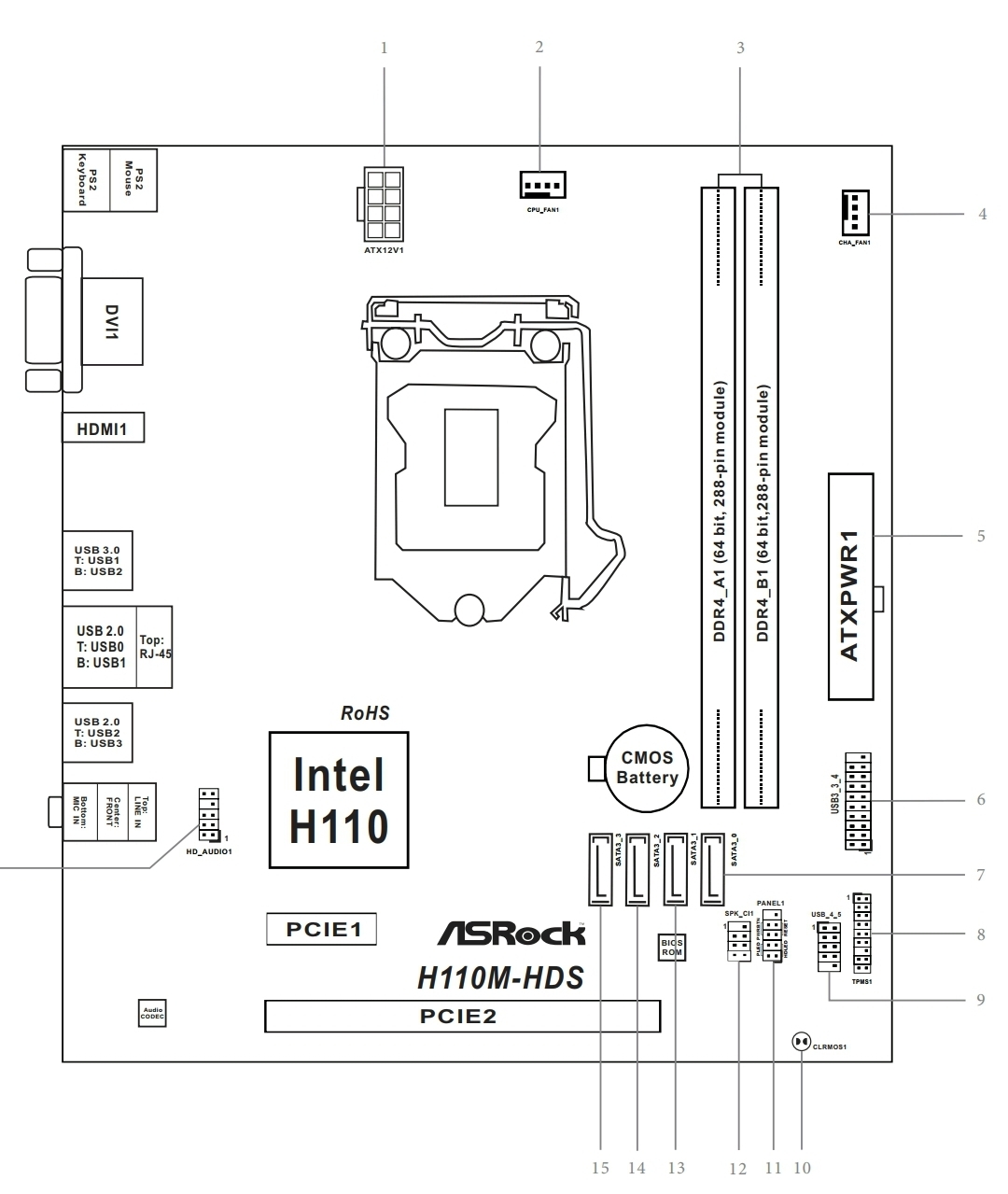
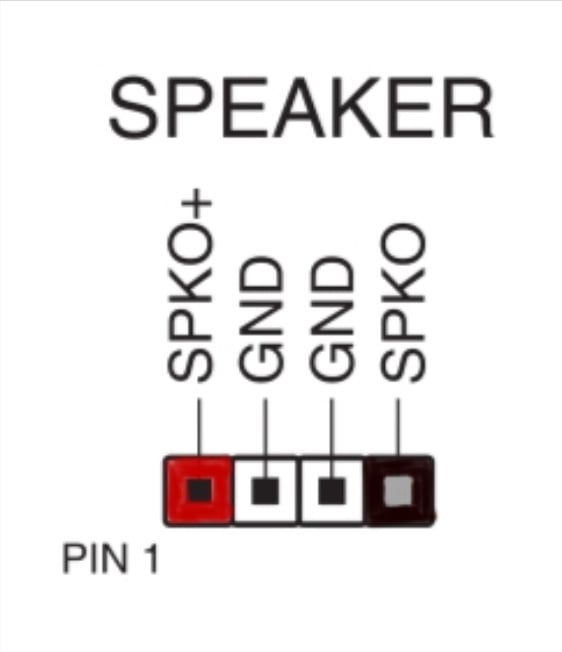
 #11. System panel. One left of it is for the wee speaker.
Also check that your chassis is wired up to this correctly, or, better yet, you can be a madlad and unplug it all and see what works. The caveat to that is… you have to know what order to do that in. Generally, your power supply has wires that go to all sorts of stuff, make dang sure you don’t power your cpu for very long without the fan/cooler. Once you know the cpu power and fan is working, keep plugging more stuff in til you find the problem.
I’d also mention if anyone hasn’t, be mindful of static.
Yeah. There should be a page in the manual with a diagram of your board and it’ll tell you where.
 .
I am SOBER and this gave me the W-I-L-L-I-E-S fuck
Depending on what cpu it is, you should be able to try it without the gpu. Also Google the mobo and try to find its manual. The manual will tell you things like what you can plug in and where. It’ll tell you compatibility crap too. You’ll have two spots on the back where you plug in the displayport/hdmi cable for your monitor – the gpu, and the mobo. Use mobo port and take out the gpu and see if it starts. POST is key. My old gigabyte was a badass and had a led number box so troubleshooting was cake. With other ones, there’s gonna be miscellaneous spots with lil lights that’ll blink (the manual for the mobo will tell you)
Fuck Cobra, and, also, hard agree. Healthcare should just…exist. Accessibly.


Compromise: be the king of Doritos but also have ample opportunity for a job that actually pays a living wage; and good insurance to coincide with said title
 2·2 years ago
It’s a shame, really. There’s so much good there, and so much that I miss, but the gop wholeass hijacked the whole state.
 5·2 years ago
There’s a hotkey. Pain in the ass, sure, but less so with a programmable mmo mouse lol
It was standard for professional correspondence where I work, but then they took out the ruler function. Why they think mouse-drawn highlighting of text looks good, I’ll never know. I asked for lightshot.
If you’re handy, I encourage you to look into changing your own. Biggest hurdle for me personally was knowing where to drop off old oil. Also, fumoto valves. Game changer.
Grumpily observing the ampere app on two devices I’m charging simultaneously, disappointed the charging brick isn’t living up to its hype of 67W. Yes, I even pulled out the converter website because the app provides both mA and voltage.
I could be snuggling cats. Spooning my girlfriend. Settling in for the night, but, alas. I was promised “super fast charging” and only got “fast charging”.
I am CRYING 🤣☠️
There’s a million better ways to insult Caitlyn Jenner, such as referring to her as hot garbage!

Fascinatingly enough, Samsung’s text from image produced this:
G00 000 000
Dear
Thank you for your letter
5 Park Road, Richmond, Surrey TW10 6NS 6.9.22
I am so glad you are interested in stick insects. Iam too and, when I was your age I also kept some. They are indeed fascinating.
There are at least two thousand five hundred different species world-wide. Most come from the tropics and only a few species ever reach this country. Scientifically speaking they belong to a group called the Phasmatoidea which contains two main groups - the leaf insects and the stick insects. Stick insects really do look exactly like thin green sticks and are almost impossible to spot in the wild - unless they move. They don’t, in fact, move much during the day but quite a lot during the night. The kind that is usually brought over here are nearly females and lay eggs that are fertile without having being fertilised by the male. The eggs look exactly like their droppings and sometimes people who keep them don’t know this and throw them away when they are cleaning out their cages.
The one of which you sent me a photograph, however is not, however a stick insect. It’s a leaf insect. There are many many different species of these as well, They vary in the food they prefer and many eat other kinds of leaves than the hawthorn and bramble which you say yours prefer. Many of them are even more like leaves than yours are, with outgrowths on their legs that look exactly like leaves. Wicle
J bor
000 o0e
X